
A visual environment for building software with AI — without writing traditional code.
AIS Studio is the visual development environment for the ADAAS Architecture Intelligence Platform. Product teams, business analysts, architects, domain experts, and developers define, explore, and evolve software using business concepts, application intent, architecture, and AI — instead of starting with source code.
Describe what you want to build. Understand the application. Let AI and the platform handle more of the implementation.
AIS Studio is the environment for working with AIS (AI-Script), part of the ADAAS Architecture Intelligence Platform.
Software development without starting with code
Traditional development environments are built around source code: a developer opens an IDE, creates files, chooses frameworks, writes classes and functions, and configures dependencies. That model works well for professional developers — but most people who understand a business problem are not professional programmers.
A product manager understands the customer journey. A business analyst understands the rules of a process. A domain expert understands the data and relationships better than anyone in engineering. An architect understands how the system should be structured. Today, all of them must hand their knowledge to developers through documents, diagrams, tickets, and meetings before it becomes software. AIS Studio changes the starting point.
The application can be designed at the level of business intent — not source code.
Start from what the business already knows
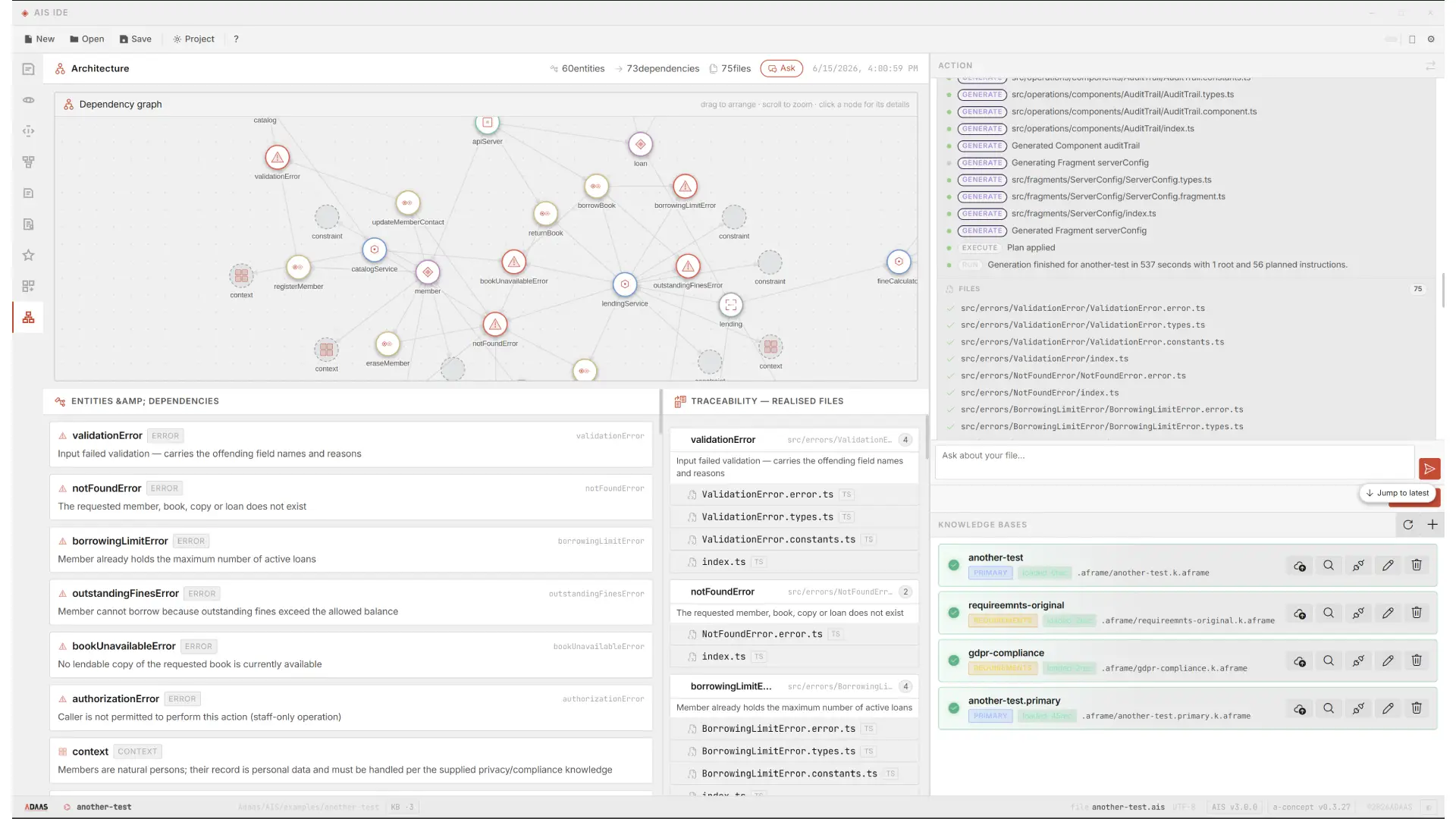
AIS Studio can begin from existing requirements and domain knowledge, extract the concepts they contain, and turn them into a structured application model — the raw material for AI-driven implementation.
What is AIS Studio?
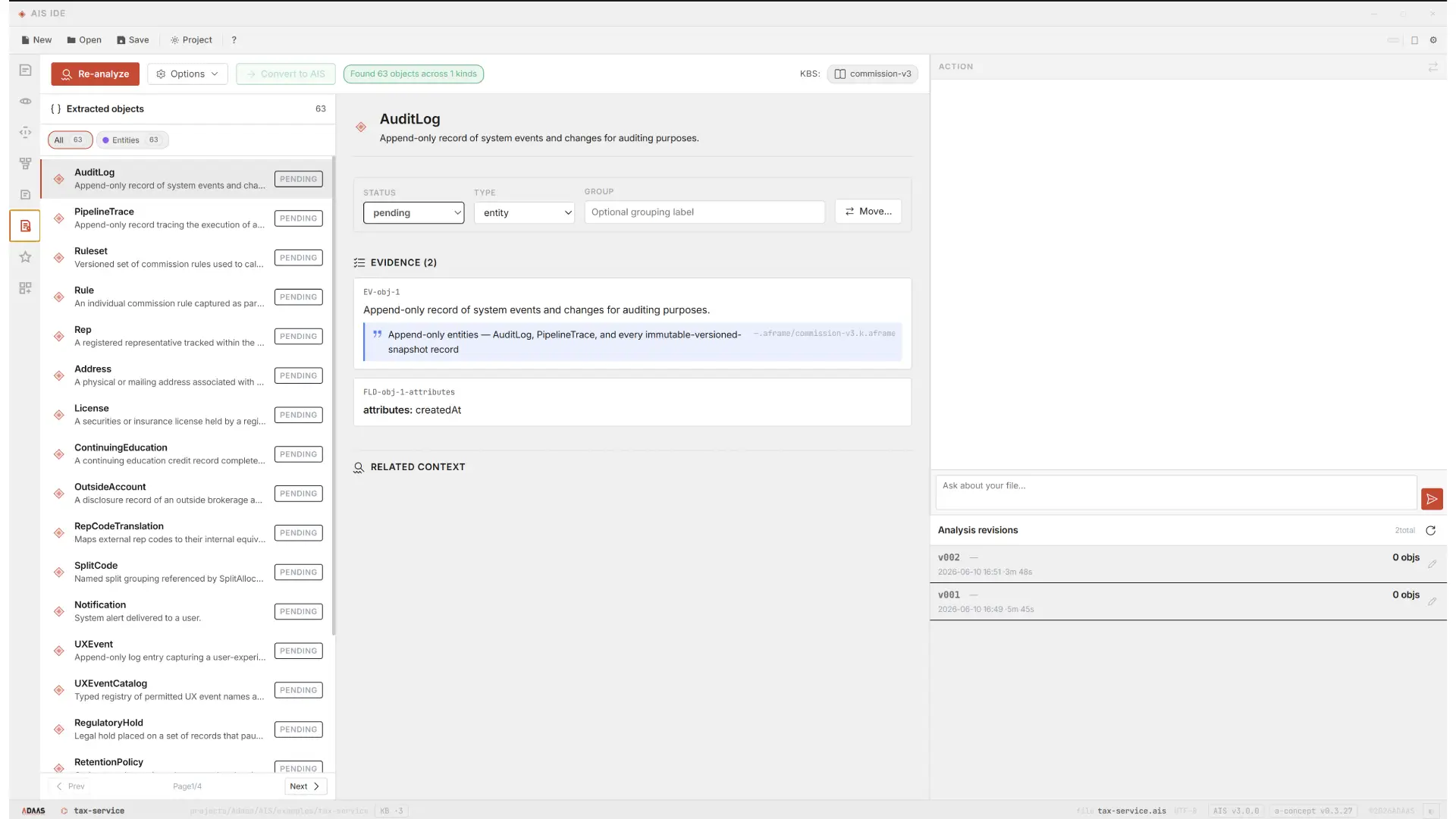
AIS Studio is a visual environment for working with the concepts and structures that define an AI-native application. It provides an interface for the ADAAS application model rather than requiring users to manipulate source code as their primary development surface. Users work with concepts such as:
- business entities
- relationships
- application contexts
- features
- workflows
- capabilities
- application components
- architecture
- dependencies
- knowledge
- AI-generated implementations
- runtime behaviour
The goal is to make the structure of an application understandable and actionable without requiring users to understand every underlying implementation detail.
Designed for people who understand the business
AIS Studio is deliberately not limited to professional developers. It is designed for the people who understand what the software needs to accomplish.
- Product managers
- Define product capabilities and application behaviour without translating every requirement into technical instructions.
- Business analysts
- Represent business processes, entities, relationships, and rules directly within the application model.
- Domain experts
- Bring domain knowledge directly into the software development process.
- Solution architects
- Define application structures, relationships, boundaries, and architectural intent at a higher level.
- Technology leaders
- Give teams a common environment for turning business requirements into working software.
- Developers
- Work with the underlying implementation when required — but they are no longer the only people who can meaningfully interact with the application.
AIS Studio is not designed to make developers code faster. It is designed to let more people participate in creating software.
Everyone works with the same application model
A product manager sees customers, accounts, products, capabilities and workflows. An architect sees contexts, relationships, boundaries and dependencies. A domain expert sees business concepts and rules. An engineer sees the implementation behind those concepts. AI sees a structured model together with its knowledge and constraints. Everyone is working with the same underlying system.
From a business idea to a working application
Imagine a product manager who wants a customer management application. Instead of writing a requirements document and handing it to engineering, the product definition can begin directly inside the application model:
concept('customer management') {

  entity('a customer of the business') { ref: customer }

  entity('an account that belongs to a customer') {
    ref: account
    stores(ref: customer)
  }

  entity('a contact method for a customer') {
    ref: contact
    stores(ref: customer)
  }

  feature('shows an overview of a customer, their accounts and contacts') {
    stage('load the customer', ref: customer_reader)
    stage('load the accounts', ref: account_reader)
    stage('load the contacts', ref: contact_reader)
  }
}
The user does not need to know how to implement a database, an API, a service, or a frontend component. The model expresses what is required, and the ADAAS platform uses it — together with available knowledge, architecture, components, and AI — to produce the implementation.
A visual way to understand software
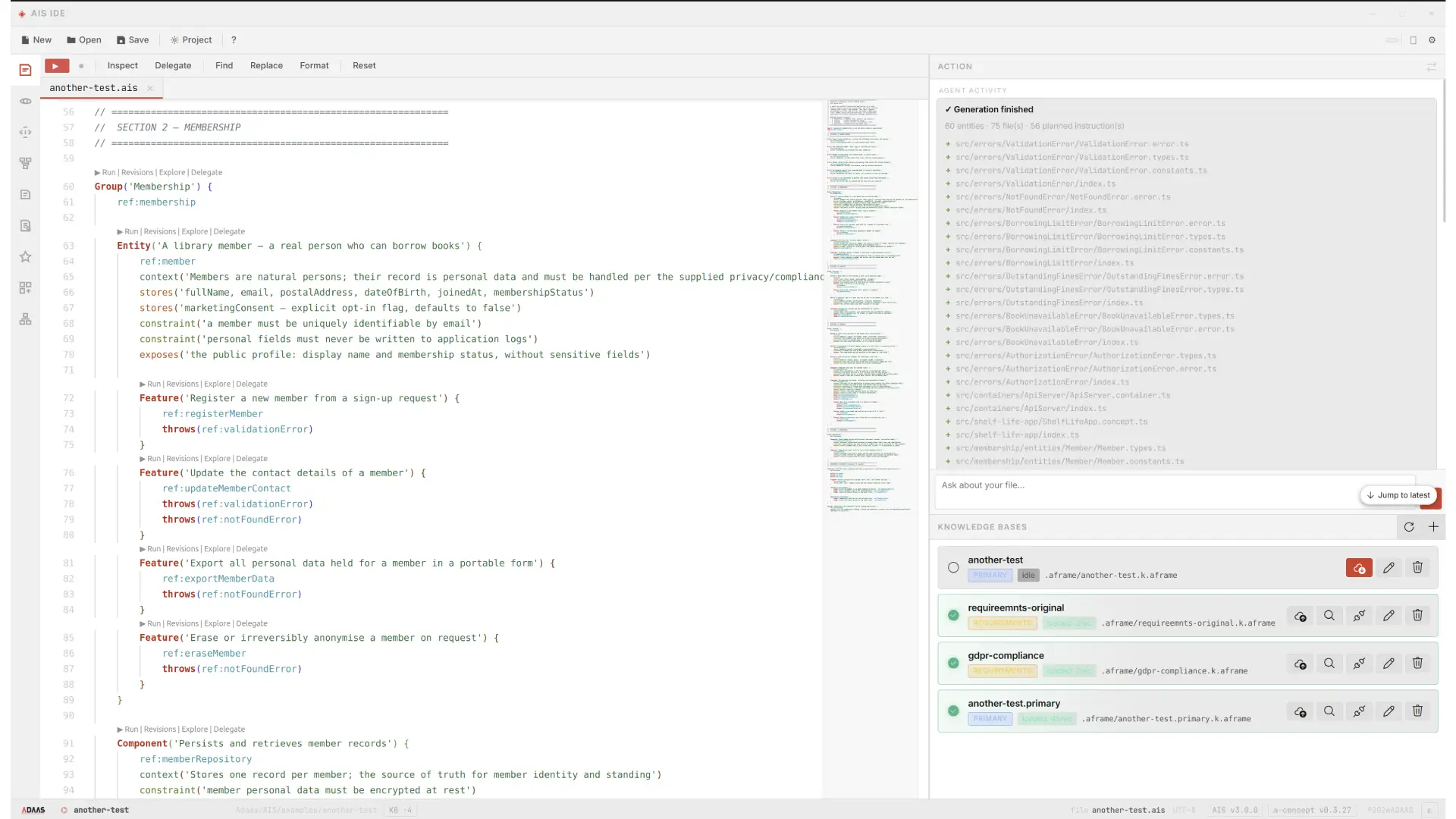
Modern software hides its complexity inside source code — thousands of files, hundreds of services, databases, APIs, components, integrations, dependencies, configuration, and business rules. Understanding an application usually means navigating a large technical structure. AIS Studio provides a higher-level view. Instead of asking “which file implements this feature?” a user starts with “what does this feature do?” and navigates from the business concept down to the architecture and implementation behind it.
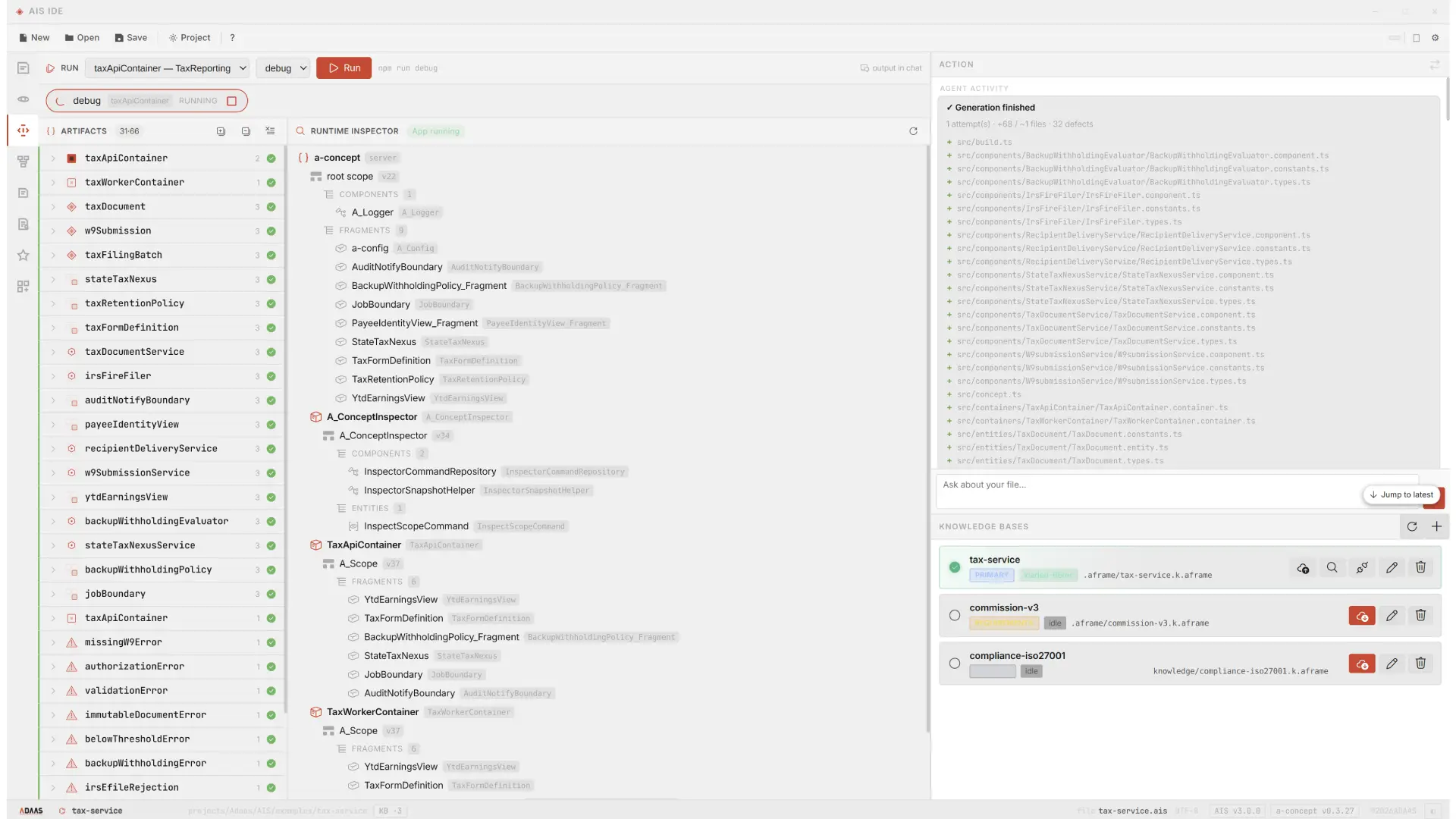
AI becomes the implementation layer
A conventional AI workflow looks like User → Prompt → AI → Code. AIS Studio enables a broader model: User → Intent → Application Model → AI → Implementation. The user defines what should exist and what the application should do; the platform provides the architectural and technical context; AI helps transform that intent into implementation. Users do not need to become expert prompt engineers or master the entire technology stack before creating useful software.
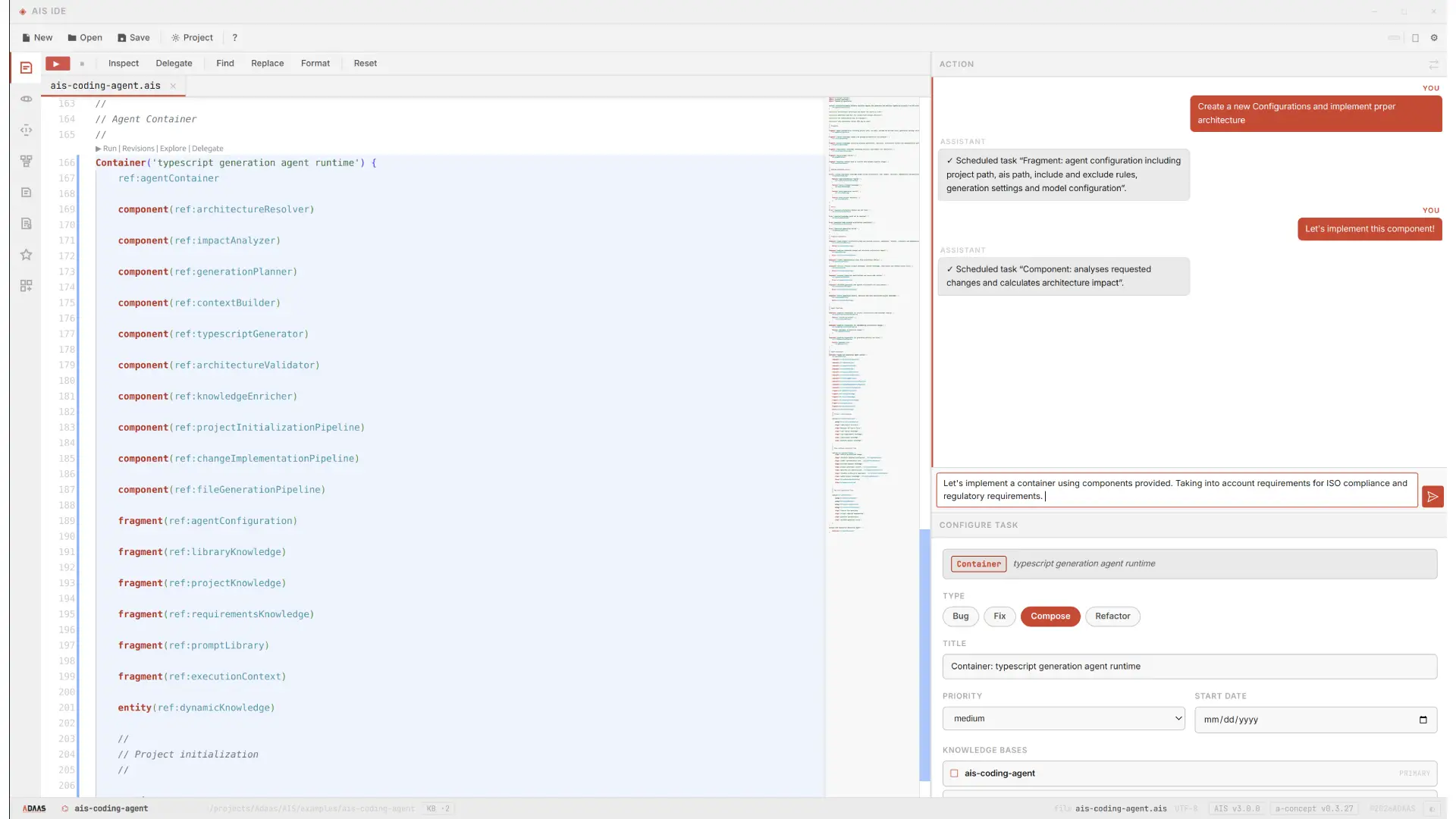
Adding a business capability
Suppose a business user wants: “when a customer opens an account, create a follow-up task for the relationship manager.” In a traditional environment this could require a developer to understand customer services, account services, event handling, task management, database structures, API contracts, authentication, and frontend behaviour. In AIS Studio the capability begins from the business behaviour:
feature('creates a follow-up task when a customer opens an account') {
  stage('detect that an account was opened', ref: account_opened_event)
  stage('create a follow-up task', ref: follow_up_task_creator)
  stage('assign the task to the relationship manager', ref: task_assigner)
}
The user describes business behaviour, not implementation. The platform uses the application’s existing concepts and architecture to determine how it should be built.
Changing an application
AIS Studio is not only for creating applications — it is designed for changing them. When a product manager decides “customers should see their account activity grouped by month,” the requested capability can be expressed directly against the application model:
feature('shows customer account activity grouped by month') {
  stage('load the customer transactions', ref: transaction_reader)
  stage('group the transactions by month', ref: monthly_grouper)
}
The existing application context tells the platform how these concepts relate, and AI assists with determining the required implementation changes — a much shorter path from business decision to software change.
Beyond low-code — and beyond no-code
AIS Studio may look similar to no-code or low-code platforms, but the philosophy is different. Traditional no-code tools provide predefined building blocks that users assemble through configuration. Low-code reduces the amount of code developers write. AIS Studio reduces the amount of implementation detail users need to specify, by working from a deeper application model rather than a fixed catalogue of prebuilt screens.
| Traditional development | Low-code / no-code | AIS Studio | |
|---|---|---|---|
| Starting point | Source code | Prebuilt visual components | Business intent & concepts |
| You specify | Every implementation detail | Configuration of building blocks | What the software should mean |
| Flexibility | Full, but code-heavy | Limited to provided blocks | Open application model |
| Who participates | Developers | Config-capable users | Business & technical teams |
| Role of AI | Coding assistant | Optional add-on | Core implementation layer |
The objective is not to hide programming behind visual widgets. It is to move software creation to a higher level of abstraction.
Working with AI without becoming an AI engineer
AI-powered development can create its own barrier — users feel they must learn prompt engineering, models, agents, context engineering, RAG, APIs, and model configuration. AIS Studio abstracts much of that complexity. Users work with the application; the platform manages the relationship between:
- intent
- application context
- knowledge
- architecture
- AI models
- agents
- implementation
- execution
AI becomes an integrated part of the environment rather than a separate tool users must master.
From requirements to working software — with traceability
Organizations usually have a long chain between an idea and working software: Business → Product → Analysis → Architecture → Engineering → Development → Testing → Operations. Every transition loses information. AIS Studio shortens that chain and keeps intent connected to implementation — and because the application model is structured, coverage between requirements and what was actually built can be measured.
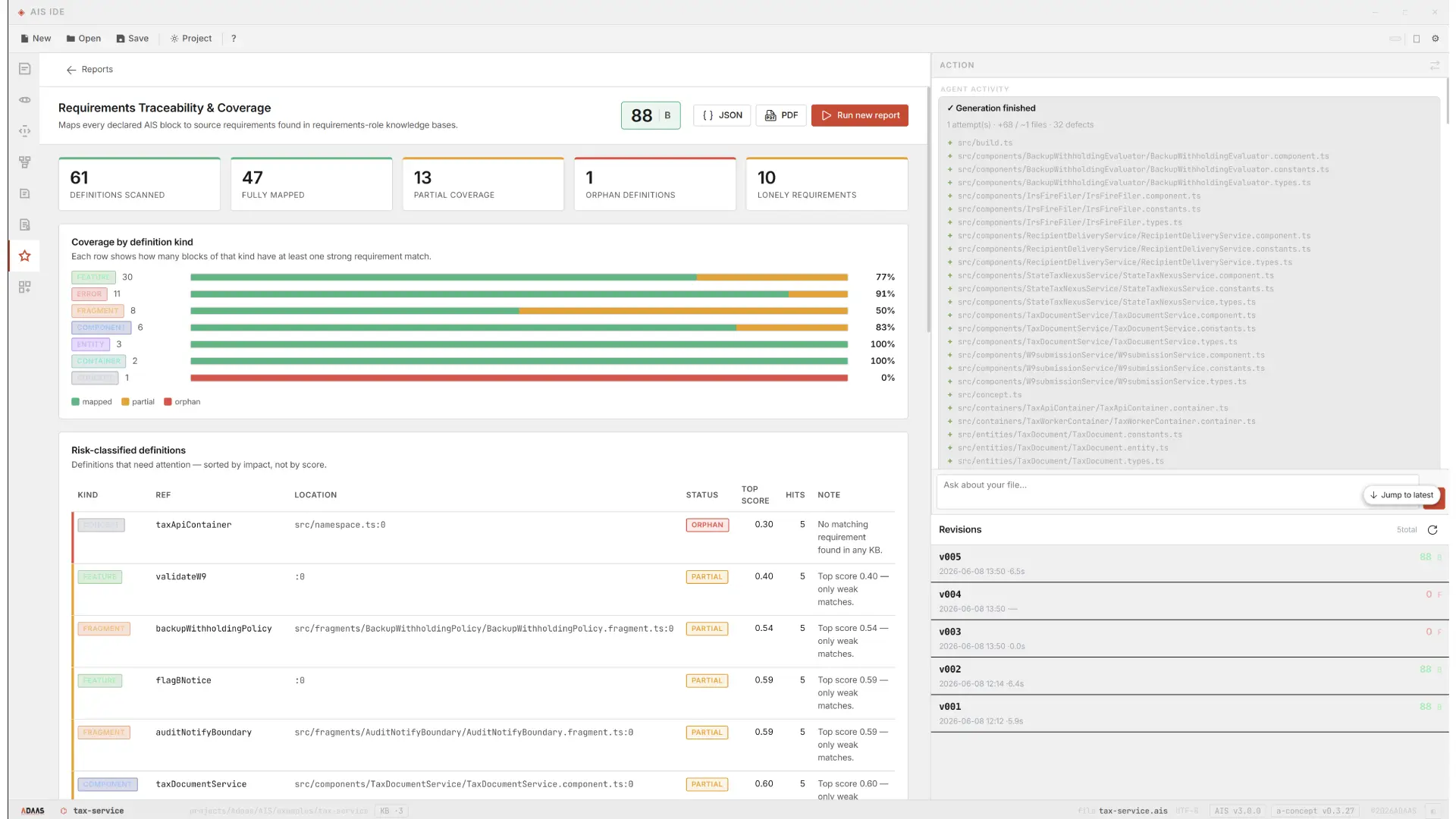
AIS Studio inside the ADAAS platform
AIS Studio is the environment; it works with the language, the framework, and the runtime of the broader Architecture Intelligence Platform. AIS expresses intent, A-Concept provides the conceptual framework, A-Frame provides indexing and composition, and A-OS provides the operating environment for the applications you build.
The future of software development is not only for programmers
AI changes who can participate in software creation. As it handles more implementation work, the bottleneck moves from writing code to understanding and defining what should be built — and that knowledge already lives across product teams, business analysts, operations, domain experts, architects, customer-facing teams, and executives. AIS Studio brings that knowledge closer to the software itself.
The future is not simply “AI writes code.” It is people describing what software should do — and AI turning that intent into software. AIS Studio is the environment for that interaction.
Frequently asked questions
What is AIS Studio?
AIS Studio is the visual development environment for the ADAAS Architecture Intelligence Platform. It lets users define, explore, and evolve applications through concepts, intent, architecture, and AI rather than requiring source code as the primary interface.
Is AIS Studio an IDE?
AIS Studio provides many capabilities of a development environment, but it is intentionally different from traditional source-code-centric IDEs. It is designed around applications, concepts, architecture, and intent.
Is AIS Studio only for developers?
No. Developers can use AIS Studio, but they are not its only or primary audience. It is designed so product managers, business analysts, domain experts, architects, and other non-developer users can participate directly in software development.
Can non-developers use AIS Studio?
Yes. A central purpose of AIS Studio is to let people who understand business requirements and domain concepts work with software without understanding traditional programming languages and implementation details.
Is AIS Studio a no-code platform?
Not in the traditional sense. It is based on a higher-level application model in which users define concepts and intent, while AI and the ADAAS platform generate and manage more of the underlying implementation.
What is the difference between AIS and AIS Studio?
AIS is the AI-Script language used to express application intent. AIS Studio is the environment in which users work with AIS and the broader application model.
How is AIS Studio different from a traditional IDE?
Traditional IDEs are organized around source code, files, projects, and languages. AIS Studio is organized around applications, concepts, features, relationships, architecture, and intent.
Can developers still access source code?
Yes. The higher-level experience does not eliminate the underlying implementation. Developers can work with the generated code when deeper technical control is required.
How does AI work in AIS Studio?
AIS Studio provides the application context and structured intent that AI uses to assist with creation and evolution. AI operates within the broader ADAAS architecture, knowledge, and component environment rather than relying only on isolated prompts.
Who should use AIS Studio?
Product teams, business analysts, domain experts, architects, technology leaders, and organizations looking to expand AI-assisted software development beyond traditional engineering teams.
Go deeper
Build software at the level of business intent — not source code.
AIS Studio gives product teams, business experts, architects, and developers a shared environment for defining and evolving AI-native applications: business intent → application model → AI → implementation → execution.